 Main Street Suite
Text messages
How people agree to texts, and what they get
Main Street Suite is software from Coastal Carolina Tech LLC. Small businesses such as tax and immigration offices, salons and repair shops use it to book appointments, check in walk-ins, send invoices and collect documents. The suite texts a business's customers and workers only after they agree, and only about their own dealings with that business. It sends no marketing texts.
The texts
Who sends themThe business the person deals with, through Main Street Suite, from a number Coastal Carolina Tech operates through Twilio. A customer's text starts with the business's name; a worker's timesheet alert starts with "TimeFlow".
What they're aboutAppointment confirmations, changes and reminders; "you're next" and "it's your turn" for walk-ins; invoices with a link to view or pay; documents to sign or upload; a reminder that a document on file is about to expire; sign-in links; timesheet alerts for workers.
How oftenMessage frequency varies with the person's appointments, visits, invoices, documents and timesheets. Message and data rates may apply.
ChoiceAgreeing to texts is never a condition of booking, buying or working. Reply STOP to stop, START to resume, HELP for help. Carriers are not liable for delayed or undelivered messages.
Every way someone agrees to texts
These are the only ways. The screenshots are the suite's own screens with a sample business, "Example Tax & Notary". Every box starts unticked for someone who hasn't agreed yet, and nothing requires it. Staff can't switch a customer's texts on from their record, only off, and customer lists imported from another system never carry consent.
1. Online booking, on a public web page
A business's booking page, at suite.coastalcarolinatech.com/book/?b= followed by the business's
short name, asks for the customer's details in step 4. Under the phone number is a box the customer ticks
themselves. It links the text program's terms and the privacy policy's section on texts.
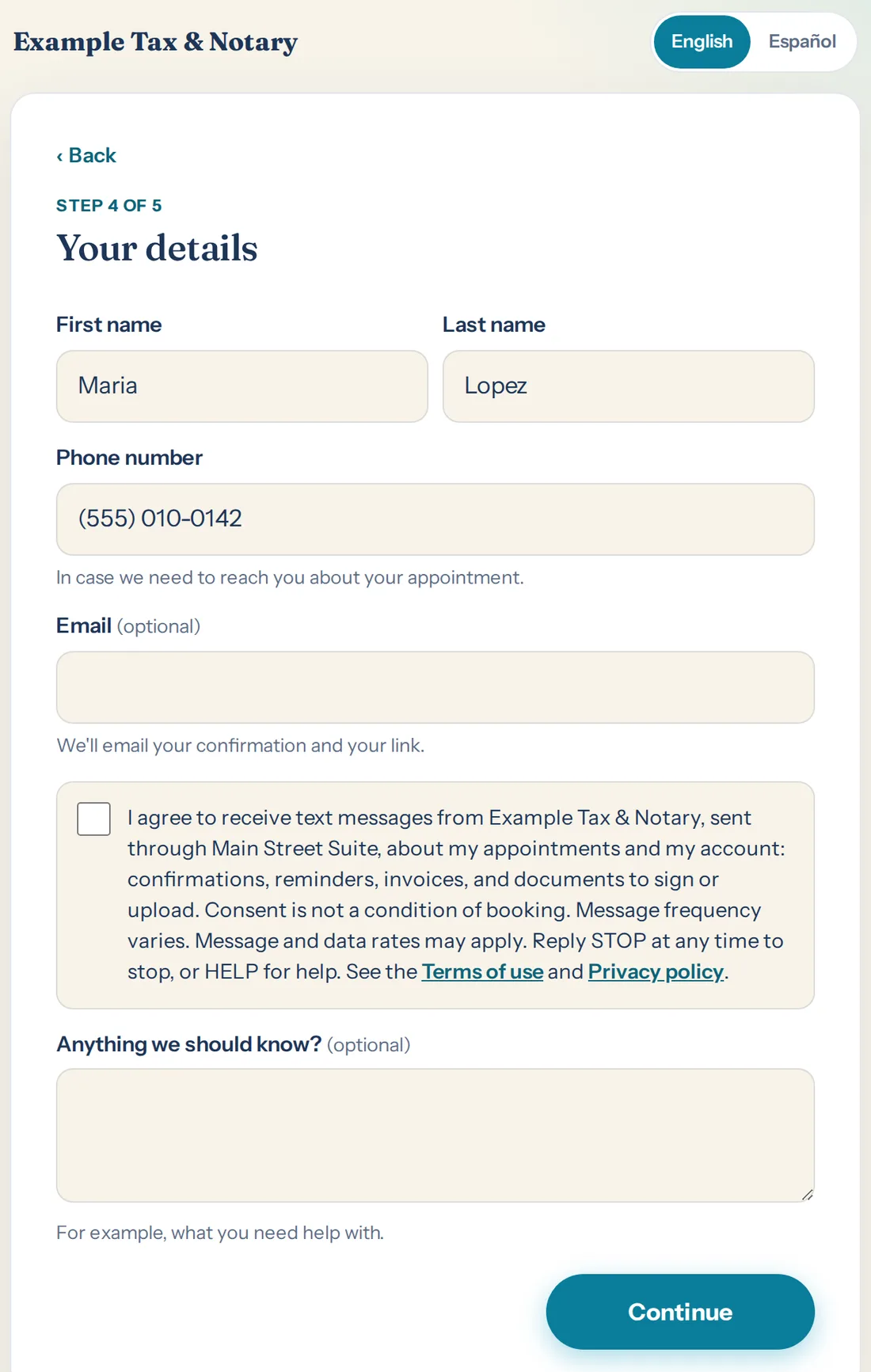
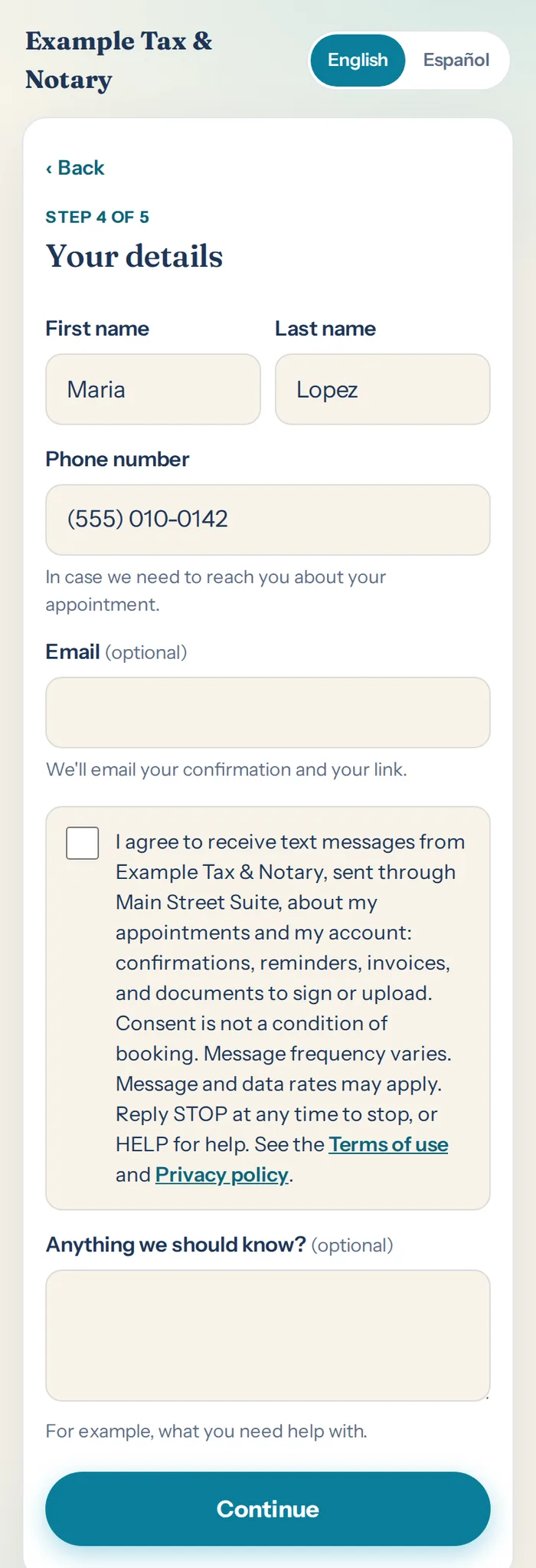
The box, in EnglishI agree to receive text messages from [the business], sent through Main Street Suite, about my appointments and my account: confirmations, reminders, invoices, and documents to sign or upload. Consent is not a condition of booking. Message frequency varies. Message and data rates may apply. Reply STOP at any time to stop, or HELP for help. See the Terms of use and Privacy policy.
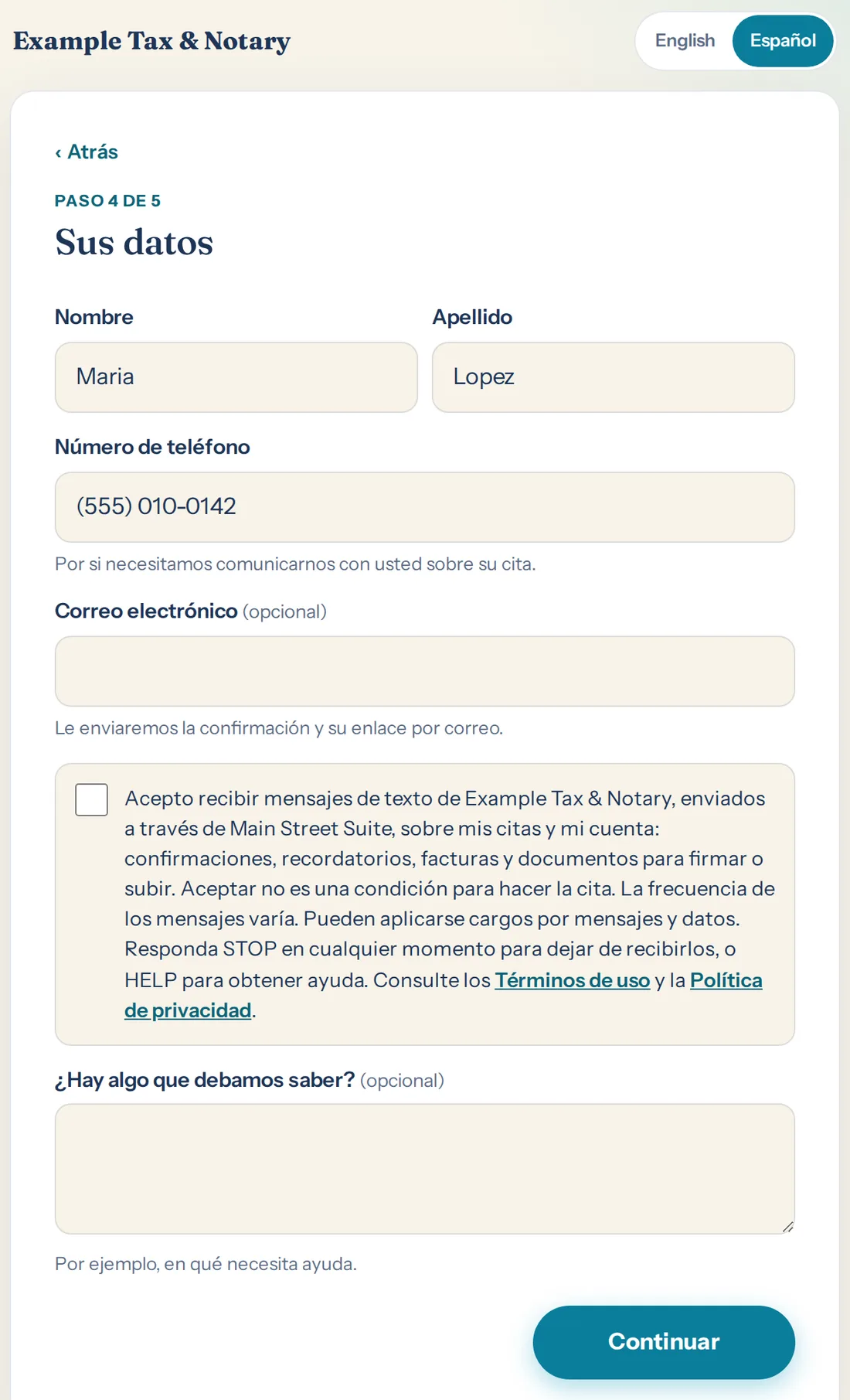
The box, in SpanishAcepto recibir mensajes de texto de [el negocio],
enviados a través de Main Street Suite, sobre mis citas y mi cuenta: confirmaciones, recordatorios, facturas y
documentos para firmar o subir. Aceptar no es una condición para hacer la cita. La frecuencia de los mensajes varía.
Pueden aplicarse cargos por mensajes y datos. Responda STOP en cualquier momento para dejar de recibirlos, o HELP
para obtener ayuda. Consulte los Términos de uso y la Política de privacidad.
The customer's first text confirms the booking and ends "Reply STOP to opt out."
2. In person or by phone, at the front desk
When the front desk books for a customer, the booking form has an unticked box and, under it, the question the staff member reads out. They tick the box only if the customer says yes.
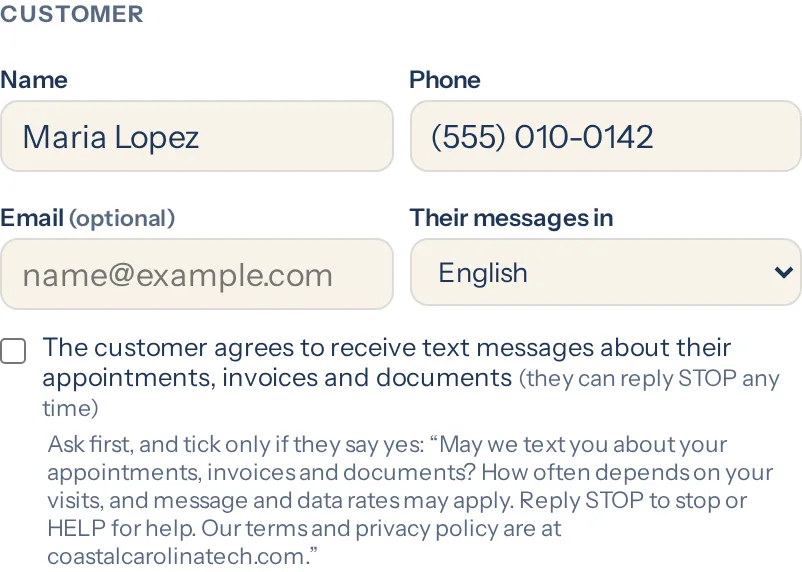
What the front desk asks"May we text you about your appointments, invoices and documents? How often depends on your visits, and message and data rates may apply. Reply STOP to stop or HELP for help. Our terms and privacy policy are at coastalcarolinatech.com."
3. Checking in at the lobby kiosk, for one visit
A walk-in checking in on the business's lobby tablet can ask to be texted when it's their turn. That consent is for that visit only: at most two texts, "you're next" and "it's your turn".
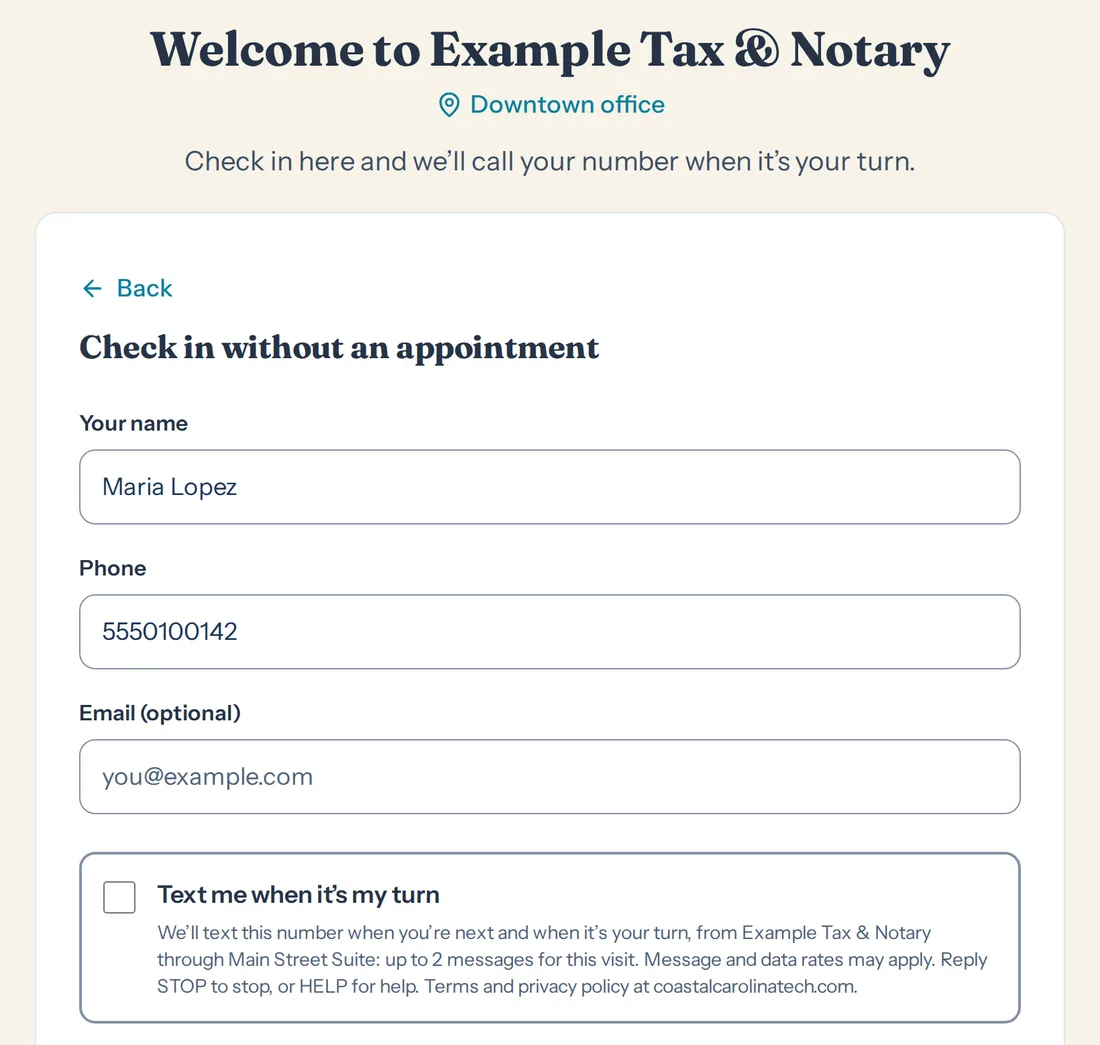
The boxText me when it's my turn. We'll text this number when you're next and when it's your turn, from [the business] through Main Street Suite: up to 2 messages for this visit. Message and data rates may apply. Reply STOP to stop, or HELP for help. Terms and privacy policy at coastalcarolinatech.com.
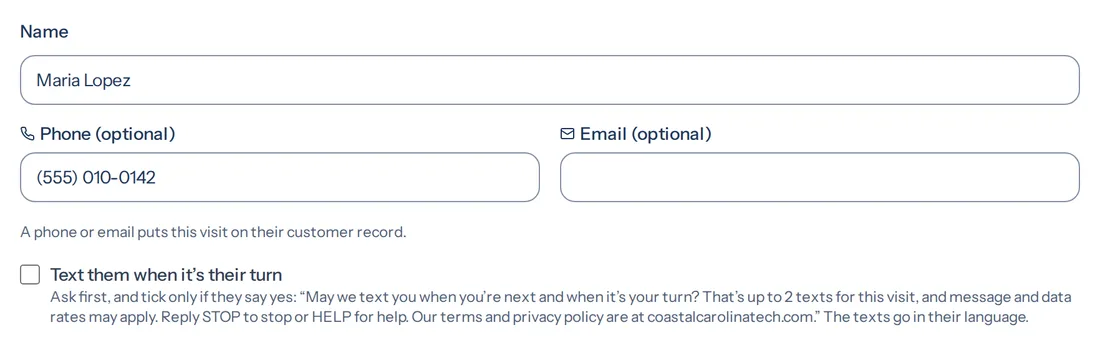
When the front desk adds a walk-in themselves, the same offer is read out, and the box is ticked only on a yes.
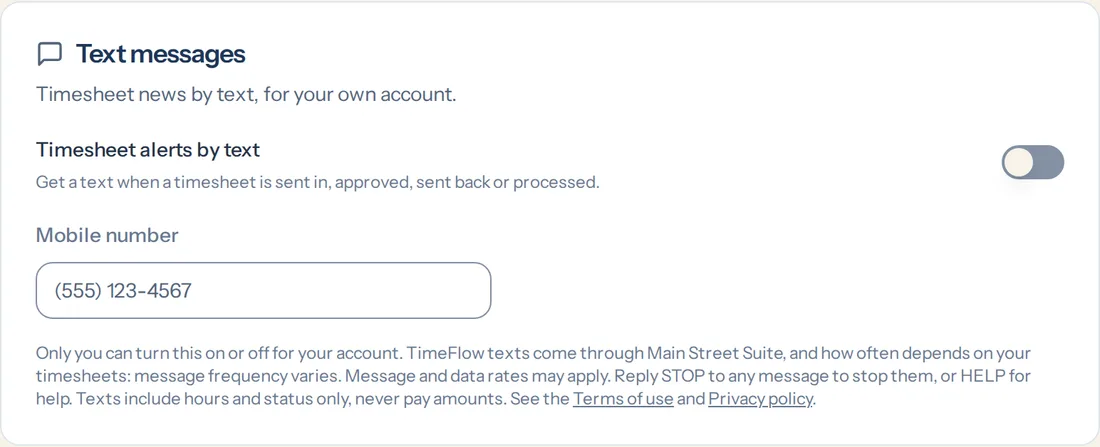
4. Workers: timesheet alerts and sign-in links
A worker turns on "Timesheet alerts by text" for their own account. It's off until they do, and only they can change it. A text confirms it: "You're signed up for TimeFlow timesheet alerts. Reply STOP to opt out."
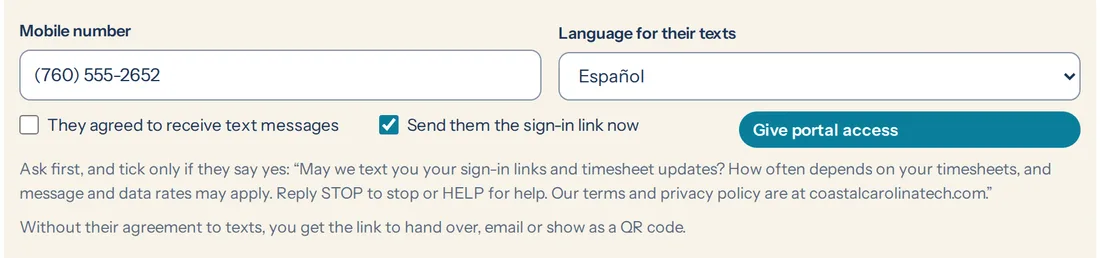
A payroll office giving a worker access to the pay portal records the worker's spoken yes the same way, after reading out the question on the form. Without it, the sign-in link is handed over, emailed or shown as a QR code.
5. START, after STOP
Someone who replied STOP can reply START to get texts again. START only brings back texts a person agreed to before. It never signs up a number that hadn't agreed.
What the texts say
Written by the suite from its own templates, in the person's language. Links open the person's own appointment, invoice or request.
- Booking confirmedExample Tax & Notary: you're booked for Tax preparation on Tue, Oct 6 at 2:00 PM at Downtown. To confirm, change or cancel (until Mon, Oct 5 at 2:00 PM): https://suite.coastalcarolinatech.com/a/… Reply STOP to opt out.
- A walk-in's turnExample Tax & Notary: it's your turn at Downtown. Please come to the front desk, number 12. Reply STOP to stop these texts.
- An invoiceExample Tax & Notary: your invoice INV-2026-0042 for $150.00 is due Oct 15. Pay it here: https://suite.coastalcarolinatech.com/pay/?t=… Reply STOP to opt out.
- A renewal coming upExample Tax & Notary: Maria, your green card expires on March 15, 2027. To renew, book a time: https://suite.coastalcarolinatech.com/book/?b=… or call (555) 010-0100. Reply STOP to opt out.
- DocumentsExample Tax & Notary: please upload your documents for "Tax return 2025" here: https://suite.coastalcarolinatech.com/u/… Due by October 15.
- A worker's timesheetTimeFlow: Your timesheet for the week of Sep 21–27, 2026 was approved.
Stopping and help
| STOP | Also STOPALL, UNSUBSCRIBE, CANCEL, END or QUIT. Texts stop at once and one text confirms it. The number is shared by every business using the suite, so STOP stops texts from all of them. |
|---|---|
| START | Also YES or UNSTOP. Texts the person agreed to before start again. |
| HELP | A reply says who is texting and how to reach us. Or contact the business that texted you, or write to [email protected]. |
Terms and privacy
The program terms for texts are section 7 of the Terms of Use. How phone numbers and consent are kept is section 4 of the Privacy Policy. No mobile information is shared with third parties or affiliates for marketing or promotional purposes.
Questions: [email protected]. Coastal Carolina Tech LLC, North Carolina.